Designed for iPhone Duo. At home on every iPhone.

Open your phone.
See the answer.

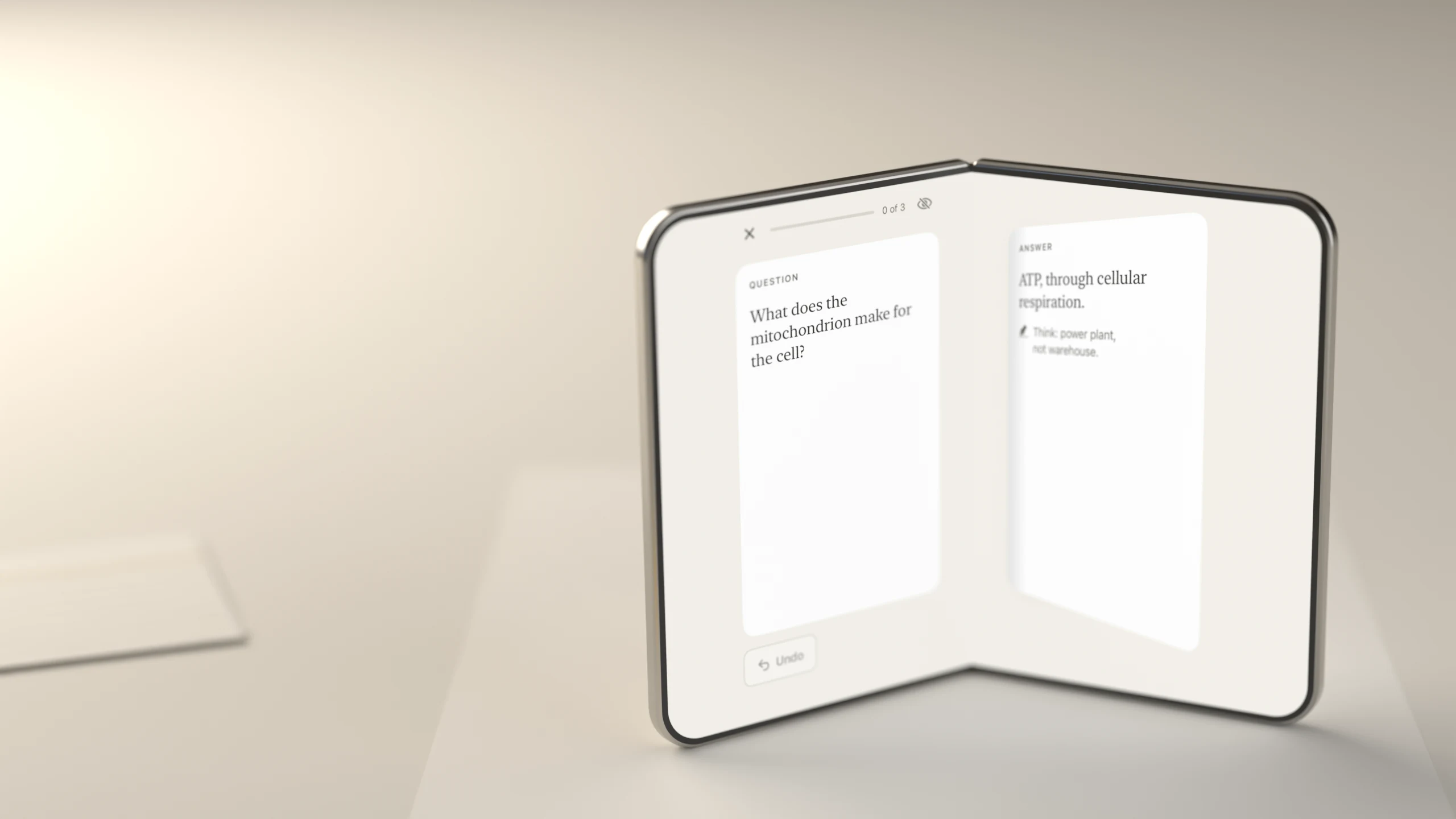
A flashcard has two sides. So does iPhone Duo. The question waits on the closed phone. Open it, and the answer is on the other half. On any other iPhone, the same card flips with a tap. Study is free, and always will be.

An iPhone Duo standing half open on a pale desk like a small book. The left page reads Question: What does the mitochondrion make for the cell? The right page reads Answer: ATP, through cellular respiration, with the note Think: power plant, not warehouse.
Open to Reveal. The question on one page, the answer on the other, the hinge as the fold.

The fold is the flip

Revealing the answer is something you do with your hands.

Every posture of the phone is a way to study. None of them is required. Fold, tap, drag or press the space bar: it is one card, one schedule, one app.

Open to Reveal

Study on the outer display with the question in front of you. When you are ready, open the phone. The question stays on the left page, the answer lands on the right, and Missed and Got it sit under your thumbs. Rate it, close the phone, and the next question is waiting.

Nothing is graded for you. Close the phone on an unrated card and it is still there, revealed, when you look again.

The closed iPhone Duo outer display showing a single question card and a Show answer button, with the hint Open to see the answer.
Closed: the question.
The open iPhone Duo. Left page: the question, with Undo under it. Right page: the answer, with Missed and Got it buttons under it. Nothing crosses the hinge.
Open: the answer. A book spread, with the hinge as the fold.

Table Mode at launch

Lay the phone flat between you and a friend. Your half shows the question, facing you. Their half shows the answer, facing them, with Hint, Missed and Got it. They quiz you the way people always have, and your schedule learns from every answer. No account for the friend, nothing copied to anyone.

On a single-screen iPhone, hand the phone over: the answer sits under a cover only your friend lifts.

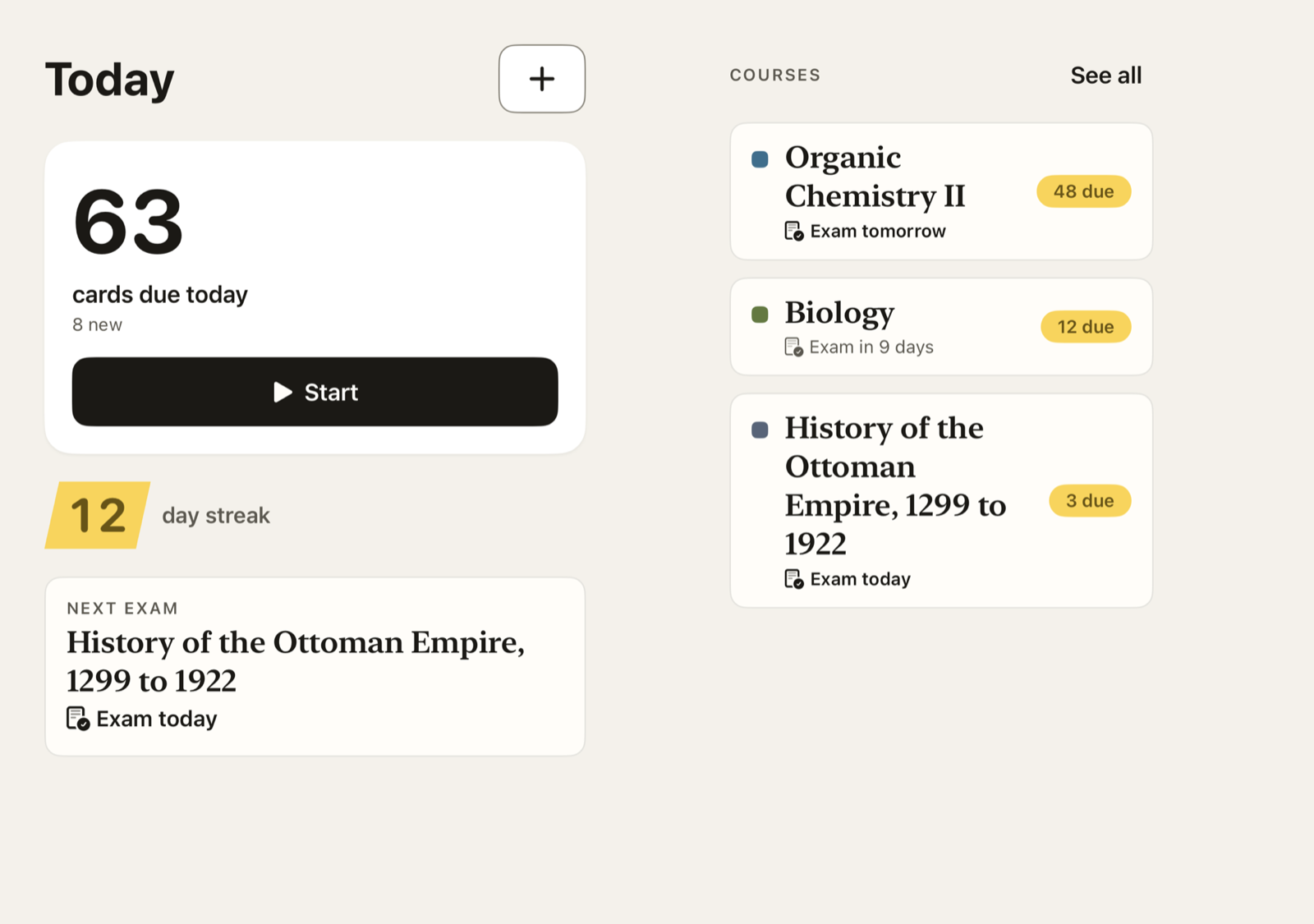
Placeholder for the Table Mode render. Shown meanwhile: the Today screen on an open iPhone Duo, due count and Start on the left half, courses on the right.
Render pending. Table Mode is being built; this frame shows Today on the open Duo meanwhile.

Laptop posture

Prop the phone half open on a desk. The question is on the raised half at reading distance, large and calm. The answer, the grading buttons and the explanation sit on the half under your hands, so nothing you need to touch is ever up where you are looking.

The iPhone Duo in laptop posture. The far half holds the question and the answer in large serif type; the near half holds the Missed and Got it buttons and a Cloud AI explanation with a Make simpler cards button.
Content up top, controls under your hands.

Cards from what you already have

Photograph the notes. Drop in the slides. Get cards back, ready to edit.

Photograph a page or drop in a deck and the cards come back with their page references, ready to edit. Soon they will appear one at a time as they are made, each one pointing back to the sentence it came from, so you can keep the good ones, skip the rest and start studying before the import has finished. streaming at launch

On the left half, page 3 of Cell Respiration.pdf with one sentence highlighted in yellow: The mitochondrion is where most of a cell's ATP is made. On the right half, index cards made from the page, including Where is most of a cell's ATP made? In the mitochondrion, cited to Page 3, with a row reading Writing more cards.
The source page on one half, the cards on the other. The highlighter shows where each card came from. at launch

From a photo

Point the camera at a page of notes or a textbook. Text is read on your phone. Short passages will become cards on your phone too. on-device AI at launch

From PDFs and slides

A chapter or a lecture deck becomes cards with page references, so you can always go back to the source. Pro

From your old decks

Anki packages import with their review history, media and sub-decks, so years of progress carry over and the schedule picks up where it left off.

Cloud results can be wrong; the cards stay editable and the source stays one tap away. Every AI result will be labelled On-device or Cloud, so you always know where it ran. labels at launch

Spaced repetition, plainly

Two buttons. Real science underneath.

Bifold schedules every card with FSRS-6, the open-source algorithm that modern Anki uses, and asks you one honest question: did you get it? Missed or Got it. Hard and Easy are a swipe away if you want them.

  • Why now. Tap any interval to see the model's own reasoning for asking today. at launch
  • Exam-aware. Give a course an exam date and the schedule tightens as it gets closer, so what matters is fresh on the day.
  • Tuned to you. After a few hundred reviews, the scheduler fits its parameters to your memory, on your phone. at launch
  • Undo, always. Mis-tapped? One tap back, in every posture.
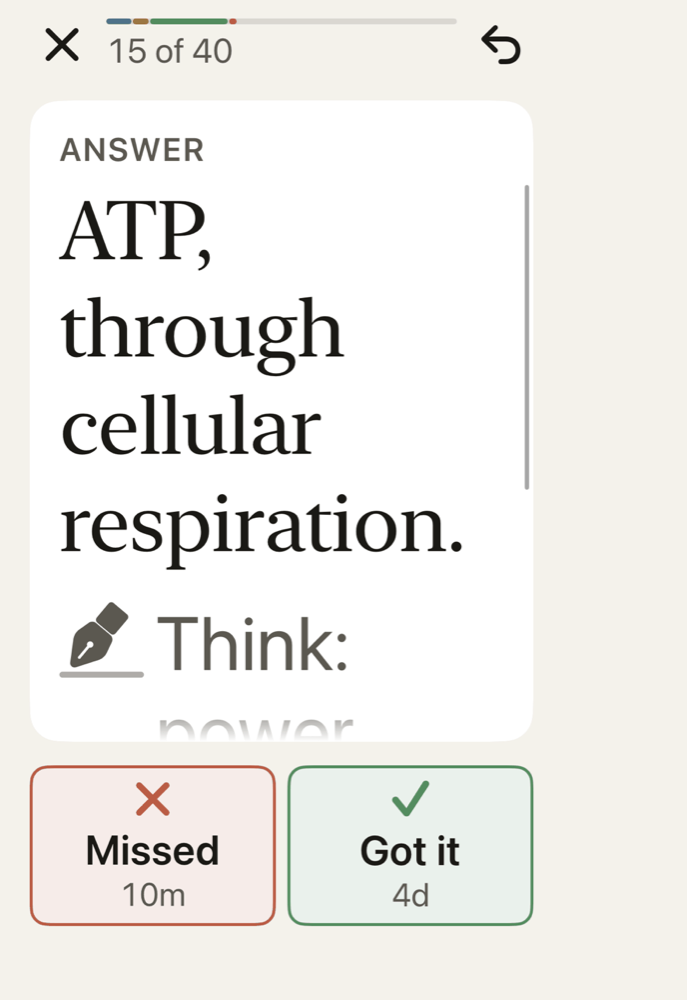
The study screen on a single-screen iPhone, card 15 of 40, after the flip. The back of the card reads Answer: ATP, through cellular respiration, with a note and an explanation labelled Cloud AI and a Make simpler cards button. Below the card, two buttons: Missed, 10 minutes, and Got it, 4 days.
On every iPhone: the same card, the same two buttons.

Numbers you can trust

Every chart is drawn from your real review log. Nothing is invented to look good.

Retention, the week ahead, and sixteen weeks of reviews, in ink on paper. When there is no data yet, the chart is replaced by a sentence that says what to do, never by a row of zeros.

The Stats screen on an open iPhone Duo. Left half: tiles for Retention 92%, Reviews in 7 days 362, Study time 54 minutes, Mature cards 412, and a 16-week review heatmap. Right half: a 7-day forecast bar chart and a 10-week retention line against a 90% target.
Stats on the open Duo. The numbers shown are the app's preview data.

Free to study. Forever.

The scheduler, your cards, sync, import and every fold are free. Pro is the AI that saves you time.

No timers, no lockouts, no ads, and no paywall between you and a review. Bifold Pro adds cloud AI for PDFs, slides and long text, deeper explanations, and advanced stats. Prices are drafts until launch.

Free

  • Unlimited cards and courses
  • FSRS-6 scheduling, exam dates
  • Anki import with history
  • iCloud sync, widgets
  • Every iPhone Duo feature Table Mode at launch
  • On-device AI hints and cleanup at launch

Bifold Pro

  • Everything in Free
  • Cloud AI: PDFs, slides, photos, long text
  • Long-form Explain and simpler cards
  • A quality check on AI-made cards at launch
  • Advanced stats and course themes themes at launch
  • Semester Pass: four months, pay once draft

Built for everyone

A full study session with VoiceOver. Text up to the largest sizes. Light, dark, and every orientation.

Accessible by design

Start to finish by VoiceOver, with a rotor for the card side. Card text never truncates at the largest accessibility sizes; it scrolls. Reduce Motion swaps every animation for a crossfade. Buttons carry labels and glyphs, never colour alone.

Private by default

No tracking and no third-party analytics. Your cards sync through your own iCloud. Cloud AI sends only the material you choose, and keeps nothing after the request.

Read the privacy policy

The study screen at the largest accessibility text size. The question and answer scroll inside the card in very large serif type; Missed and Got it are stacked below with their glyphs and labels.
Dynamic Type at AX5, nothing cut off.

Coming to the App Store.

Bifold is in development for iPhone Duo and every iPhone running iOS 17 or later. A student TestFlight comes first. To hear when either is ready, write to us.